
T1 intake, done before your preparers open the file
Agents gather each client's documents, record every slip against its source, and list what is still missing. Your preparers start with a file that is ready to prepare.
Two ways to have Armada T1 running at your firm this tax season.
Armada 1040 is coming soon: the same record and MCP server, for US individual returns. Join the waiting list.
Armada T1
The context system agents need to automate T1 workflows
A reliable place to put everything
The current status of every tax file
Which sections apply to each client
Every task and decision, with its history
A safe environment to work in
Every input validated, nothing invented
Permissions scoped to each agent
A controlled handoff once the file is complete
A firm opportunity and growth driver
Opportunities found in your T1 data
Firm services matched to the clients who need them
Work items a partner can act on
Two ways to get Armada T1 this tax season
Both build the same tax file under the same rules. The difference is who runs it. A firm can use both.
Run it yourself, with your own assistant
For single preparers and small firms.
Add Armada T1 as a custom connector in the Claude desktop app, ChatGPT, or another assistant that supports MCP. You run it, on your own assistant and your own plan. It reads the documents you point it to, records them on the client's tax file, and asks you what it cannot settle. Every answer you give goes on the file.
Who runs it: the preparer, on their own assistant and plan
Who sets it up and keeps it working: the preparer
When it works: when the preparer starts it
Open questions: the preparer answers them as they come up
Where documents come from: wherever the preparer points it
What your firm sets up: a custom connector in Claude or ChatGPT
Have Blackspark run it for you
For firms with several preparers and partners.
Blackspark sets up a managed intake agent for your firm, runs it and keeps it running. It watches the place your firm already keeps client documents, such as Microsoft SharePoint, Google Drive or your practice management system. When a document arrives, the agent files it on the right client's tax file, records what it says, and turns anything it cannot answer into a task for your team. Nobody at your firm has to start it or look after it.
Who runs it: Blackspark, for your firm
Who sets it up and keeps it working: Blackspark
When it works: when a document arrives
Open questions: they become tasks for your team
Where documents come from: the document source your firm already uses
What your firm sets up: read access to your document source, granted by your administrator
From a client's documents to a file your preparer can trust
Documents arrive where they always have. Clients keep sending slips, receipts and statements to the folder, inbox or portal your firm already uses.
Armada T1 holds the file. Armada T1 is the context system agents need to automate T1 workflows, with its own MCP server. Every value an agent records is checked against what a T1 requires for the year, and every record links to the document it came from. Each open question becomes a task for a named person at your firm.
Your preparers prepare and file in the tax software you already run. Armada T1 does not calculate or EFILE returns. The completed file is handed off to the CRA-certified tax software your firm already runs. For firms on CCH iFirm Taxprep or Personal Taxprep, Armada T1 delivers the file itself: how it works with CCH iFirm Taxprep and Personal Taxprep.
Safe by design
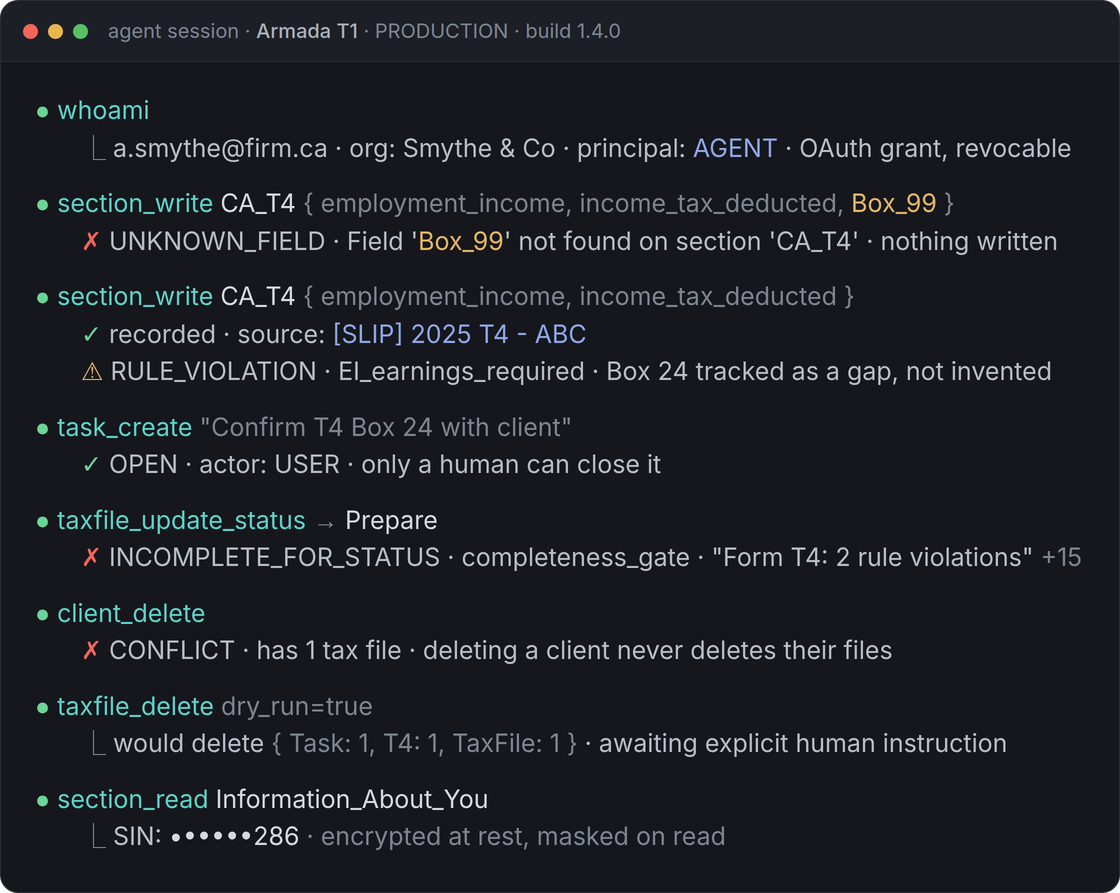
Agents operate; Armada T1 governs. An agent is held to the same rules as a person, and to stricter ones when nobody is watching.
It never guesses whose document it is. A document that could belong to more than one client waits for a person to decide.
Every write is checked. A value that does not fit the year's T1 requirements is refused, and a missing value stays a tracked gap.
Every record is traceable. Each one names its source document, and each change is logged under the account that made it.
Each agent has its own account. The managed agent's credential is good for one run and ends when the run does.
It cannot do the irreversible. The managed agent cannot delete a file or a client, or export your firm's data.
Your firm holds the switch. Unattended intake is off until your administrator turns it on, and any run can be stopped.
Social insurance numbers are protected. They are encrypted at rest and masked wherever they are shown.
Client data stays in Canada. With the default model, the managed agent and your firm's documents run on Blackspark's AWS infrastructure in Canada.
Reports inside Armada T1
Find the advisory work already in your T1 files
Armada T1 keeps each client's return figures by CRA line, year over year, and runs your firm's reports over them. Your firm sets the thresholds. A partner decides what to do with each finding.
Report types
Tax planning Income jumps, capital gains, a new source of income, taxable income just under a bracket edge
Financial-planning discovery High individual or household income with little investment income and a small RRSP deduction
Incorporation review Business net income over two years, its growth, wages paid
Employer growth A first payroll, wage growth
Bookkeeping conversion Business size, the number of statements on the return, rents
Cross-sell A business, rental, foreign property or corporation on the return with no matching service on your firm's list
Returning clients A prior-year return with no work item this season
New
One finding, as a partner reads it
Patrick Sinclair · 2025
Incorporation review
Business net income 130,000 ≥ 100,000 Lines 13500 and 13700, 2025 · from CCH iFirm
Grew 189 % over 2024 (45,000 → 130,000) ≥ 30 % with net ≥ 50,000 Lines 13500 and 13700, 2024 and 2025 · from CCH iFirm
Suggested step Incorporation review (and the T2 engagement that follows)
Services on record None
Work each finding in Armada T1, or hand the list off as a spreadsheet or a work item in your practice management app.
Works with what you already run
Your firm keeps its documents, its people and its tax software. Client documents come from wherever they arrive today, and the completed file goes to the tax software you already use.
Microsoft SharePoint
Google Drive
Karbon
TaxDome
CCH iFirm Taxprep
Personal Taxprep
We keep a running scoreboard of which tools have an MCP server today: MCP servers for Canadian tax and accounting software.
Building your own agents?
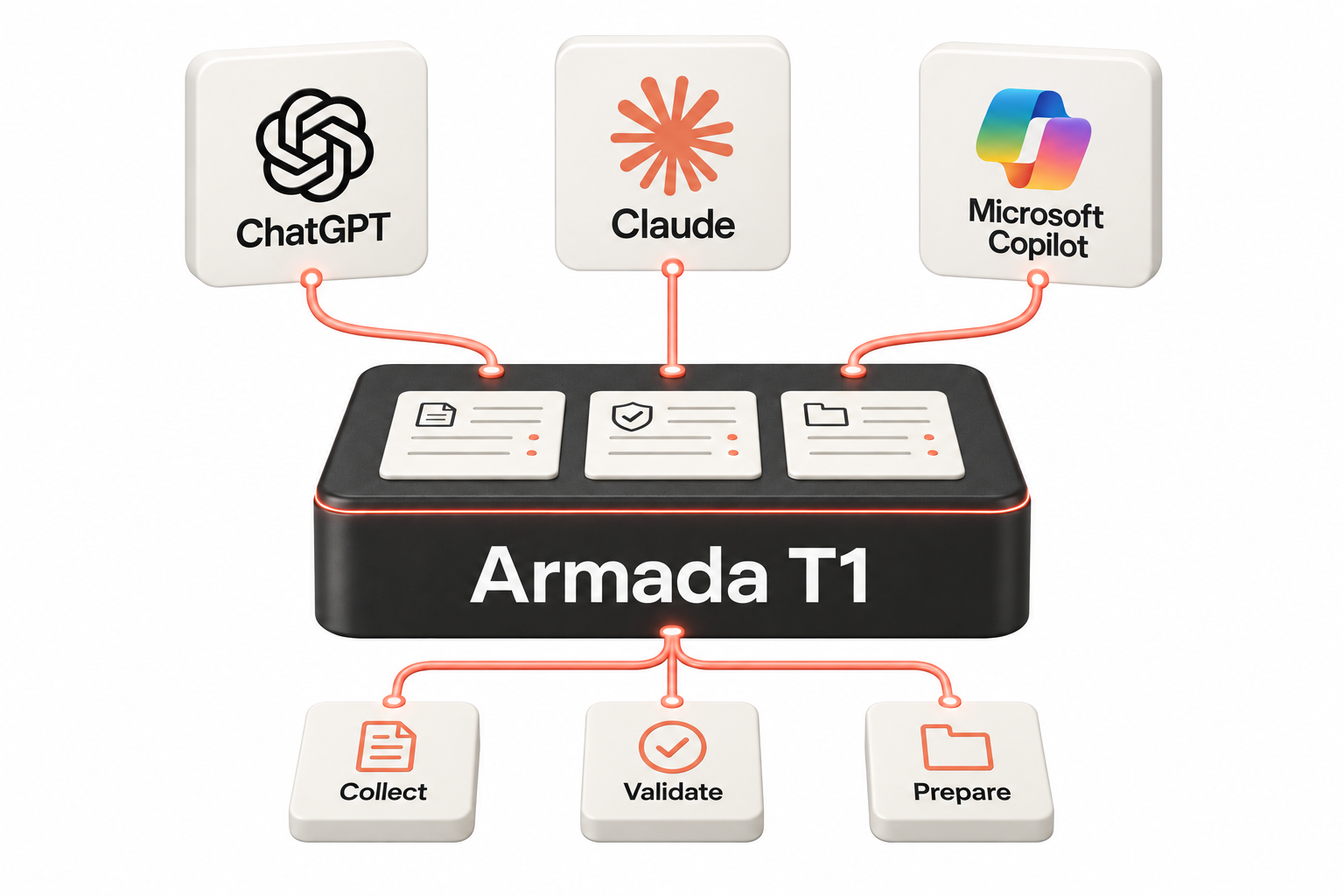
Everything Armada T1 does is available through its MCP server and API, to an agent acting as a named user of the firm. Consultants, MSPs and internal automation teams build their own tax preparation agents on the same record and the same rules. For developers and agent builders
Request Demo
Tell us how many returns your firm files and where client documents arrive. We will show you the setup that fits.
Building for US 1040? Join the Armada 1040 waiting list.