
If your firm runs on Karbon, your practice management is already in good shape: work items, templates, client tasks, a portal your clients actually use. What Karbon was never built to do is the tax work itself - reading the donation list that just landed in the portal, getting it into a tax file, noticing that one amount is blank, asking the client for exactly that, and flagging the thing that needs a preparer's judgment to a preparer instead.
That gap is where your team's tax season goes. And it's now work an AI agent can do - inside the Karbon workflow you already have.
We know because we tested it, end to end, against a live Karbon tenant. This post describes what that looks like for a firm, in plain terms.
One instruction
A preparer opens Claude - the AI assistant from Anthropic that's been getting so much attention across professional services - and types:
"Start preparing a 2025 T1 for Jill Harvey."
Here's what happens next, with no one touching a keyboard:
The agent finds Jill in Karbon and checks for documents she's already uploaded. It creates the T1 work item from your firm's own template - the same checklist your staff would use. The template fires the standard document request to Jill through the Karbon client portal, so she gets the familiar email and task, exactly as if your admin had sent it. When Jill's documents arrive, the agent picks them up from the portal, reads them, and records every figure into a structured tax file in Armada T1 - each one linked to the exact document it came from.
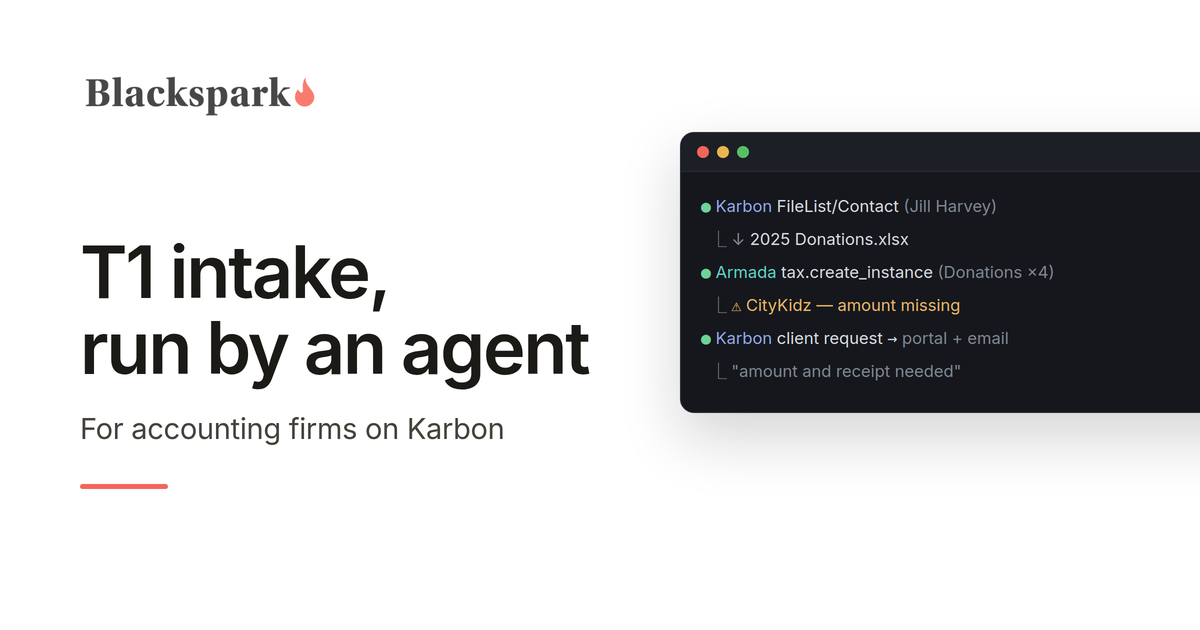
Then the part that separates this from a demo. Among Jill's uploads is the document every preparer knows: a homemade spreadsheet of her donations. Four charities. One amount blank. And a typo - "Canadia Red Cross."
Watch what the agent does with that, because this is the whole product in one moment:
It records all four donations exactly as written, each linked to the stored spreadsheet. For the missing CityKidz amount, it doesn't guess - that's information only Jill has. So it sends a follow-up request through Karbon, and Jill gets a portal task and an email asking for precisely that: "Your 2025 T1 - CityKidz donation: amount and receipt needed." For "Canadia Red Cross," it doesn't silently correct the spelling, and it doesn't pester Jill about it either - whether that's the Canadian Red Cross is a preparer's call, so a note lands in your Karbon triage instead.
Two gaps. Two different destinations. Both the right ones. And when Jill answers her portal task, the reply lands exactly where the agent is already watching.
Every step of that flow ran against live systems. Not a concept video. An AI agent working in between two separate systems, without any hard-coded integration.
The question you should be asking
Couldn't you do this with just Claude and Karbon? Claude reads documents beautifully, and Karbon has an API.
You could build that demo in a weekend. Here's what it can't survive: Karbon is a system of record for your practice - clients, work, communication. It is not a system of record for a tax return. When Claude reads Jill's donation list, the figures have to go somewhere. Without a tax platform in the loop, "somewhere" is a spreadsheet, a document, or the agent's own memory of the conversation. That fails in ways that matter to a professional practice:
Nothing checks the work. A donation record needs an organization and an amount. A 2025 T4 has more than eighty fields with CRA box mappings and rules connecting them. A spreadsheet knows none of that. Armada T1 does - every entry the agent records is validated against the actual Canadian tax data model, for the actual tax year, and the blank CityKidz amount is tracked as an explicit, open item from the moment it's recorded.
Nothing stops invention. This is the risk nobody sees until it bites. An AI that can't save incomplete work will eventually fill a blank with something plausible - a $75 that was never on any receipt. Armada T1 is designed for the opposite: an honest partial record always saves, every gap is tracked field by field, and the agent never has a reason to make a number up. A blank on the client's list stays blank in the file - with the follow-up already on its way to the client.
Nothing proves where numbers came from. When your reviewer - or the CRA - asks about a donation claim, "the AI put it in a spreadsheet" is not an answer. In Armada T1, every record links to its source document, and the document itself is stored with the file. The reviewer sees the four donations, clicks through to Jill's actual list, done.
Nothing says when it's finished. In a spreadsheet, "intake is complete" is a feeling. Armada T1 computes it - and its workflow gate refuses to advance a file with open gaps, whether an agent or a human is pushing. We watched the agent try. The platform said no. That refusal is the product.
That's the division of labour: Claude does the work, Karbon runs the practice, Armada T1 holds the return - and governs it.
What setup actually involves
No developers, no integration project, no middleware to buy:
Karbon: generate an API key from Settings (a five-minute, built-in feature), and clone your T1 work template once so the document request sends automatically when a work item is created. Your existing template, your existing client experience. For what Karbon offers AI agents directly, see our Karbon MCP server page.
Claude: your firm's Claude plan, with the Armada T1 MCP server added - a configuration step, not a development one.
Armada T1: an account for your firm.
There is no code to maintain, because there is no hard-coded integration. The agent is the integration. When we changed our minds mid-test about where documents should live, nothing had to be rebuilt - the agent adapted, the same afternoon.
What stays human
Your people keep every judgment call - starting with whether "Canadia Red Cross" is a typo or a charity you've never heard of. They review the file, advise the client, sign off, file. What they stop doing is downloading, re-keying, cross-checking, and writing "just following up on your donation receipts" emails. The agent handles the chase; the platform guarantees nothing advances until the inputs are clean; your preparers work the exceptions that surface in Karbon triage - the same place their work already lives.
For a Karbon firm, this isn't a new system to learn. Your clients see the same portal. Your staff see the same work items. The difference is who - or what - is doing the grunt work in between.
If you run T1s on Karbon and want to be among the first firms to put an agent on intake, request access on our homepage.
Working on US 1040 workflows? Armada 1040 is coming soon: the same record and MCP server, for US individual returns. Join the waiting list.
This post provides general information for tax professionals and is not tax, legal, or filing advice. Agent behaviour verified against live Karbon and Armada T1 environments, August 2026; Karbon is a trademark of Karbon, Inc., and no partnership or endorsement is implied.
