
Last month we showed an AI agent running Canadian personal tax intake inside a firm's practice management platform: reading a client's T1-related slips and receipts from portal uploads, recording validated tax data in Armada T1, and chasing missing information, with Claude bridging that platform's API and Armada T1's MCP server. A natural objection followed: fine for firms whose practice management software has an API. What about everyone else?
So we ran the same job for a firm on Jetpack Workflow, which has no published API, exposes only client and job creation through Zapier, and stores no documents at all. The agent still closed the loop. Here is what we built, what it does, and what we learned - including the parts that are harder without an API.
The setup
The firm runs its practice on Jetpack Workflow's current web app: clients, projects from templates, tasks, comments. Client documents live in Google Drive, in a simple convention the firm already used: a folder per client, a folder per tax year, and an Inbox folder where the client's slips and receipts land. Armada T1 is the tax layer: the system of record for validated T1 data, source documents, open items, and completeness.
The agent is Claude, running in a Claude Cowork session on the preparer's own computer. It reaches Drive through the Google Drive connector included in the Claude desktop app, Armada T1 through its MCP server, and Jetpack Workflow through Claude's built-in browser, inside the preparer's logged-in session. The agent never handles credentials, never emails a client, and never advances a file past what the data supports.
The instruction was the same one as before: "Start preparing a T1 for Jill Harvey."
What the agent did
It verified all three systems first: confirmed its Armada T1 identity and which environment it was pointed at, confirmed the Drive account, and confirmed the Jetpack Workflow tab showed the firm's project list rather than a login page.
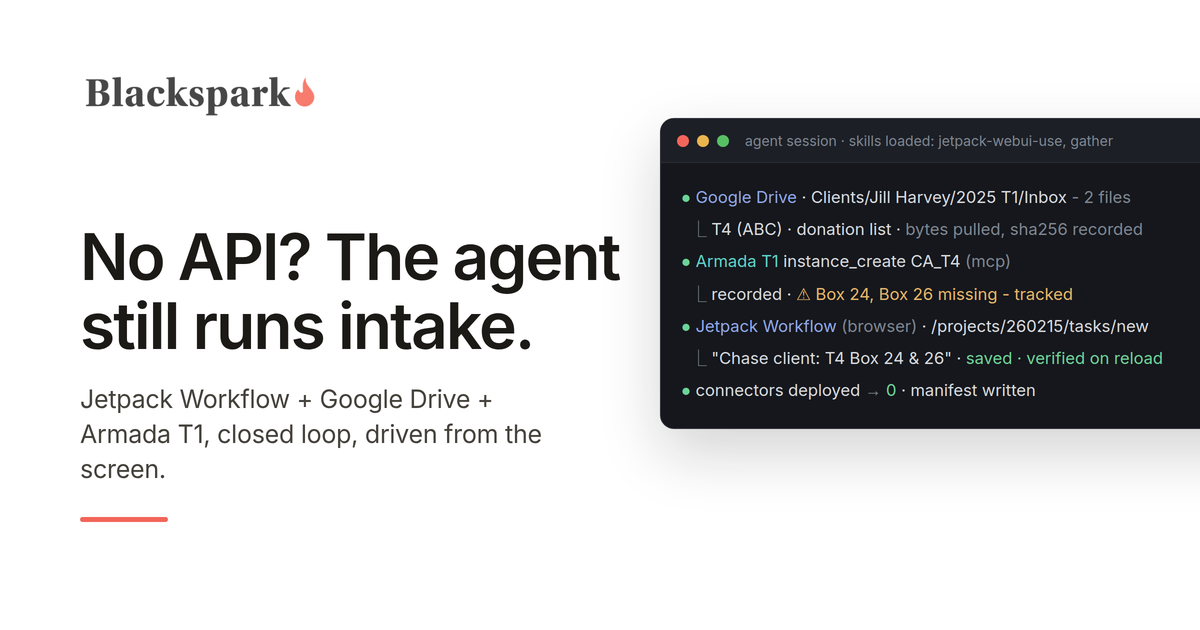
It found the client's 2025 T1 Inbox in Drive and listed every file in it. It read each document, pulling the raw bytes rather than the Google Drive connector's text extraction for anything with numbers in it (more on that below), identified a T4 and a donation list, and recorded them in Armada T1 as validated section records with the source document stored alongside each one.
It opened a 2025 T1 project in Jetpack Workflow from the firm's own template, renamed it for the client, and put the Armada T1 file link and the Drive folder link in the project description so a human landing on either system can find the other.
It ran Armada T1's completeness check and routed the gaps. The T4 was missing EI insurable earnings (box 24) and pensionable earnings (box 26); the donation list named a charity with no amount. For each, the agent created a task on the Jetpack Workflow project assigned to the preparer, with the Armada T1 task and record ids in the description, and a matching open item in Armada T1 pointing back at the Jetpack Workflow project and task. Judgment calls that did not need the client - a value that looked like a typo, a classification question - went into the project's comments instead, where they can be edited or retracted.
Then it wrote a small manifest file into the client's Drive folder: which files it processed, their hashes, and the ids of everything it created across all three systems. That file is what makes the next run cheap. When the agent ran again later that day, it read the manifest, recognized both documents as already processed, spot-checked Armada T1 against it rather than trusting it blindly, created exactly one new Jetpack Workflow task for a gap that had not yet been routed, verified it by reloading the page, and moved on.
And it closed the loop in the other direction: on each run it reads the Jetpack Workflow project page and, for every task the preparer has completed since the last sweep, resolves the matching item in Armada T1.
What is different without an API
Three things, and they are worth being precise about.
Jetpack Workflow cannot talk to the client. A platform with client requests lets the agent send the client a specific ask ("box 24 and 26 from your ABC T4") through the portal. Jetpack Workflow has no client portal and the agent does not send email, so a client-held gap becomes a task for the preparer to chase. The agent still finds the gap and still tracks it to closure; the preparer sends the follow-up.
Jetpack Workflow holds no documents. Drive is the shoebox. That turned out to be a reasonable arrangement - stable file ids, one-call folder listings, raw bytes on demand - with one catch: the Google Drive connector's text extraction scrambles slip layouts and loses the pairing between a box number and its value. So the rule became: the Google Drive connector's text is fine for "is this a T4, which year, which employer," and never the source of a number. For anything the agent will write into a tax record, it downloads the bytes and reads them itself.
Every Jetpack Workflow write is a screen interaction, and screens lie a little. The agent works from a map of the app - which controls are real form fields and which are styled widgets over hidden ones, that the due date is a calendar you have to click through, that the task panel has a Save button and so does the page behind it, that the comment box silently refuses a value that was set rather than typed. The operating rule that came out of this: after every write, reload the page and read the result back. A duplicate project in a firm's system of record is a mess; a page load is cheap.
None of this stopped the integration. It shaped it. Screen-driving is the weakest form of what we have been calling agent-mediated integration - slower per action, more brittle against redesigns, and harder to scope than an API - and it still ran the full loop. The connector does not need to exist for the agent to be the integration.
The integration artifact is still a document
As with the first build, nothing was deployed. The integration lives in two plain-language skills the agent loads when the task calls for them. One is a map of Jetpack Workflow's web app: routes, controls, quirks, the one silent failure, and how to read task state back (it is not exposed where you would expect; the agent reads it from a hidden form field, inverted, but deterministically). The other is the orchestration across Drive, Jetpack Workflow, and Armada T1: the verify-first rule, read-only Drive, verify-every-write, the manifest, and how to route gaps.
That split matters. The Jetpack Workflow map is reusable by any agent doing anything in Jetpack Workflow. The orchestration is what makes the three systems behave as one workflow. When Jetpack Workflow changes a screen, someone updates a paragraph in the first file, not code in a pipeline.
A second run also surfaced a design question the first run had left to judgment: Armada T1's completeness check lists every unfilled identity and residency field on a new file, not just gaps in the documents the agent processed. Turning twenty-three of those into Jetpack Workflow tasks would have buried the two that mattered. The rule is now explicit - route a gap only when it is anchored to a document this workflow handled; report the rest in one paragraph and offer a single interview task. That is the kind of rule that only gets written after watching an agent almost do the wrong thing, which is exactly why the second run was the useful one.
Why the governance underneath is what made this safe
Everything above depends on Armada T1 refusing to be sloppy on the agent's behalf. Unknown fields are rejected by name, never silently dropped. A missing box stays a tracked gap with a rule violation attached, not a number the agent guessed. The move to "ready to prepare" is refused by a completeness gate that names what is missing. Every recorded figure links to the stored source document. Only a human closes a blocking item. When the agent's only interface to the firm's practice management system is a screen, the layer it writes tax data into cannot also be improvised. We have written about what happens when it is.
What this means for firms
If your practice runs on Jetpack Workflow and your documents live in Google Drive, an agent can run your T1 intake today: read what arrives, record it as validated data with provenance, open the project, route the gaps to the right person, and keep the two systems reconciled. If your documents live in Dropbox, OneDrive, or another shared folder instead, the same workflow applies with small changes to the document step; nothing about the pattern depends on Drive. The preparer's job becomes the client follow-up and the judgment, not the data entry and the tracking. For what each tool offers AI agents directly, see our Jetpack Workflow MCP server and Google Drive MCP server pages.
If you want to see it on your own files, request access. And if your practice runs on something else entirely, that is mostly a question of writing the map.
Working on US 1040 workflows? Armada 1040 is coming soon: the same record and MCP server, for US individual returns. Join the waiting list.
This post provides general information for tax professionals and is not tax, legal, or filing advice. Agent behaviour verified against live Jetpack Workflow, Google Drive, and Armada T1 environments, September 2026; Jetpack Workflow is a trademark of Jetpack Workflow, Inc., and no partnership or endorsement is implied.
