
"Tax organizer" is an American term that Canadian firms adopted without the thing it originally described. In the US, the organizer is a document the tax software prints from last year's return: every slip and schedule the client had, pre-filled with prior-year amounts, with a blank column for this year. In Canada, what most firms call an organizer is a questionnaire the firm wrote itself, a document list, and a portal or an inbox to receive it all. The word survived; the automation mostly did not.
This post is for firms searching for tax organizer software in Canada, or for an alternative to the organizer they have. It covers what the options actually are, the three jobs an organizer is supposed to do, the places every version breaks, and what changes when the organizer stops being a form and becomes a set of facts on the file that an AI agent keeps current.
What organizer software looks like in Canada today
There are four shapes, and most firms run a mix.
The firm-made document. A fillable PDF or Word file, typically six to eight pages: identity and household, consents, a checkbox list of slips and receipts, and worksheets for employment expenses, rental, and self-employment. It goes out by email in January or February and comes back attached to a reply, or not. This is still the most common organizer in Canadian practice, including at firms with sophisticated software elsewhere in the stack, because it is the only version that asks exactly the questions the firm wants asked.
Letter templates in the tax software. Canadian T1 packages generate client correspondence from the prior-year file. TaxCycle, for example, ships pre-season letter templates built from the carried-forward return, and its TaxFolder portal lets the preparer trigger an "ask client to upload documents" email from inside the return. This is the closest Canada gets to the American pre-filled organizer, and it is closer than most firms realize, but the request is still a letter and the response is still a pile of uploads.
Organizers inside practice management. TaxDome's organizers are digital questionnaires with conditional logic (answers determine which questions appear next), roll-forward of last year's answers so the client is not re-entering static facts, and document upload inside the form, with the firm notified on completion. Karbon's client requests do the same job as a task-shaped conversation: each requested item is tracked to a client response, with automatic reminders. These are real improvements over the PDF, and they are the reason "organizer" and "intake" now show up as the same search.
The CRA itself. Once a firm holds a representative authorization, Auto-fill my return delivers most employment, pension, benefit, and investment slips, plus carryforwards, once the CRA has processed them, which the CRA says is generally by mid-March. This quietly replaced half of what the organizer used to collect. It did not replace the other half: the CRA can only serve what it has, T3s and late-issued slips arrive after the mid-March mark, and receipts for RRSP contributions, medical, donations, child care, and every fact that is not on a slip still come from the client.
The three jobs an organizer is for
Strip away the format and an organizer does three things.
It tells the client what to gather. That is the checklist half, and it works best when it is specific to the client (last year you had a T4 from ABC, a T5 from RBC, and a T2202; do you have them again?) rather than generic.
It captures the facts no document carries. Marital status changes, dependants, a home sold, a business started, days in the United States, whether a short-term rental was licensed, whether the client wants direct deposit. These are the questions that decide which schedules exist, and they only come from asking.
It gives the firm a status view. Who has sent what, who has not started, which files can move. In a firm of any size this is the job that matters most in March, and it is the job the PDF does worst.
Where organizers break
Every version above breaks in the same six places. Better software moves the break, it does not remove it.
It asks everyone everything. A static questionnaire has to cover the whole client base, so a salaried employee with one T4 receives eight pages of rental schedules and foreign-property warnings. Conditional logic fixes this within the form. It does not fix the deeper version of the problem, which is that the form does not know what the client had last year unless someone tells it.
The answers land as a document, not as data. A completed organizer is a PDF, or a form record in a portal. Somebody reads it and re-keys the facts into the tax file. The organizer and the return never agree by construction; they agree because a person made them agree, in March, under load.
It cannot tell "sent" from "correct." The client ticks T5 and uploads a T5. Nothing checks that it is this year's T5, from the payer the client had last year, with a joint-account split confirmed. A T4 arrives with boxes 24 and 26 blank and passes straight through. The line "if no slip, provide amount" appears on organizers precisely because the form has no way to refuse an unsupported number.
It drifts. A firm-made organizer is maintained by search-and-replace. The tax year in the header changes every January; the credits list is re-read less often. The digital news subscription credit, for instance, was only available for the 2020 to 2024 tax years and is still appearing on organizers sent out for 2025. Static documents accumulate errors nobody owns.
Organizer complete is not file complete. The organizer goes out in January. Auto-fill data is usable in mid-March. T3s arrive at the end of March. RRSP receipts for first-sixty-day contributions come separately. A file whose organizer came back on February 10 is not ready; it is waiting on three things that have nothing to do with the client's diligence, and the organizer has no way to represent that.
It cannot chase. Completion is a state; completeness is a process. The gap between "the client returned the organizer" and "every item the return needs is in hand and verified" is where tax season staff time actually goes, and the organizer, in any format, stops at the first state.
What to look for if you are buying
If you are evaluating tax organizer software for a Canadian firm, the checklist is short and the order matters.
Roll-forward from the prior year, so the request is specific to the client rather than generic. Conditional logic, so the client sees only what applies. Document upload attached to the item that requested it, with item-level status, not a shared drop folder. Answers stored as structured facts that can flow into the tax file, not as a PDF to be re-keyed. Reconciliation against what the CRA already has, so the client is only asked for what Auto-fill cannot supply. Gap tracking with an owner and a due date for every missing item, and a definition of "complete" that the file enforces rather than a person remembers. And, increasingly, an interface an AI agent can use, meaning an API or an MCP server, because the firms getting the most out of intake this year are not the ones with the best form; they are the ones where an agent runs the process.
Most products on the market do the first three well. Very few do the last four.
The agent-run alternative
Here is what intake looks like when the organizer is not a form.
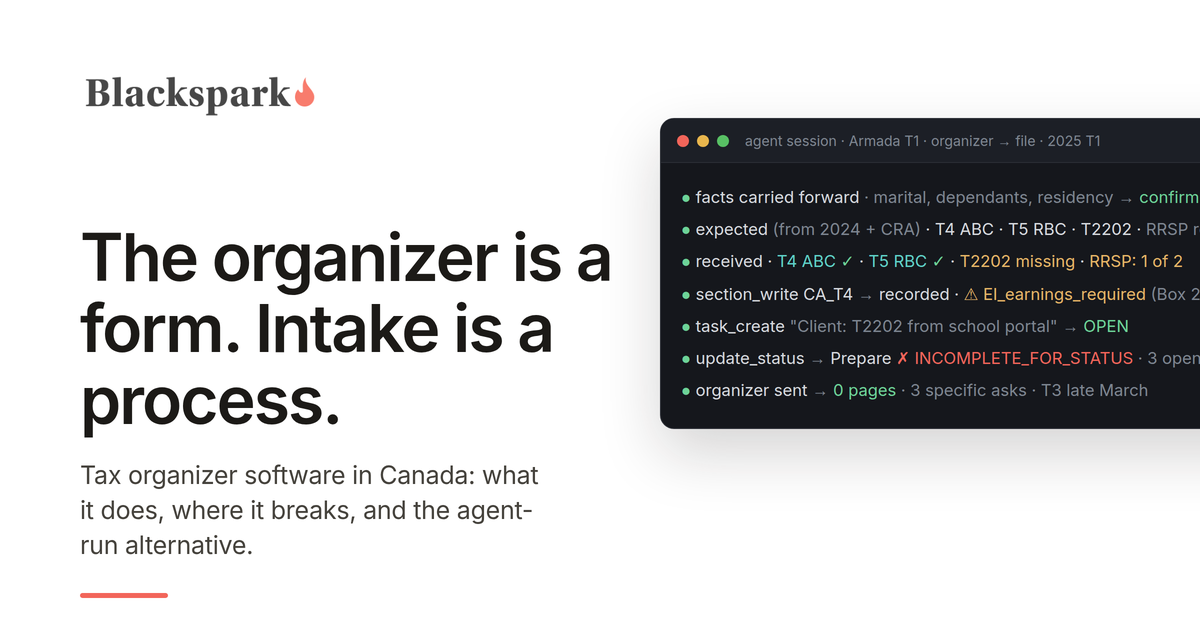
The questions in the organizer become facts on the tax file: marital status, dependants, residency, the yes-or-no life events, each recorded once with a date, carried forward, and confirmed rather than re-asked. The document list becomes the file's own expectation of what it needs, seeded from last year and from what the CRA has already delivered.
An AI agent watches where documents arrive, whether that is a portal, a practice management system, or a shared Google Drive folder. It classifies each document from its content, records the figures as validated section records in Armada T1 with the source stored alongside, and reconciles against what the file expected. Unknown fields are rejected by name. A T4 with box 24 blank is recorded with a rule violation attached, so it is in the file with its gap visible instead of silently incomplete.
Every gap becomes a task with an owner. Where the firm's practice management platform has client requests, the client gets a specific ask ("box 24 and 26 from your ABC T4") rather than a reminder to "complete your organizer." Where it does not, the preparer gets the task and sends the follow-up by email or text. The T3 that has not arrived yet is a tracked item, not a surprise.
The file cannot move to "ready to prepare" until a completeness check passes, and the check names every open item when it refuses. When it passes, calculation and filing happen in the firm's CRA-certified tax software, as they always have. Armada T1 does not calculate or EFILE returns; it does the preparation work that comes before, and it does it in a way an agent can run and a firm can audit.
We have shown this end to end for a firm on a practice management platform with an API and for a firm on Jetpack Workflow and Google Drive, which has no API at all. The organizer did not disappear in either case. It stopped being a document the client fills in and became a list the system keeps.
T1 organizer alternatives in Canada, in one paragraph
If your organizer is a PDF and you want the least disruptive step up, an organizer with conditional logic and roll-forward inside a practice management platform such as TaxDome removes the "asks everyone everything" problem and gives you a status view. If your practice runs on Karbon, client requests do the tracking job well and are worth using before buying anything else. If you are on TaxCycle, the pre-season letters and TaxFolder upload requests are already generating client-specific asks from the prior-year file, and Auto-fill my return is the biggest organizer upgrade available to any firm that has not yet put representative authorizations in place. And if you want the organizer to stop being a form at all, and to have intake run itself with validation and gap tracking underneath, that is what Armada T1 is built for. If you are starting from scratch, the T1 intake checklist has a client-facing list you can copy today and the firm-side checks the software should be doing for you. The checklist and the questionnaire are also available together as an editable Word document, the T1 Client Intake Kit, if you want a working organizer today rather than software.
If you want to see an agent run intake against your own files, request access.
This post provides general information for tax professionals and is not tax, legal, or filing advice. Product descriptions reflect vendor documentation and CRA guidance as published in September 2026. TaxDome, Karbon, TaxCycle, TaxFolder, and Jetpack Workflow are trademarks of their respective owners, and no partnership or endorsement is implied.
